Carry your favourite cards on your compatible Samsung smartphone or watch.
More than a wallet.
Make payments on the go by linking your favourite credit or debit card to your Samsung smartphone. Just tap your device at the terminal to quickly and securely complete your transaction.
Secure payments
-
Samsung Pay doesn’t send your actual credit or debit card number with your payment.
-
We use a digital card number to represent your account information - so your card details stay safe.
-
Find out more about Bendigo Bank card security.
Setting up Samsung Pay
-
1Open the Samsung Wallet and tap the ‘all’ tab, and then tap ‘payment cards’. If you have a Samsung watch, pair your devices before opening Samsung Pay on your phone.
-
2Add your credit or debit card by scanning the card with your camera or manually typing in the card details. Enter the 3 digit CVV when prompted.
-
3Read and agree to the Terms of Service.
-
4Choose your verification method and enter code.
How to use Samsung Pay in store
Mobile
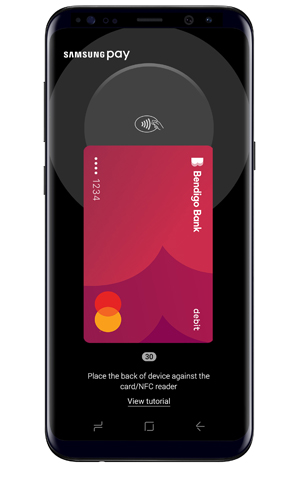
Simply swipe up your home screen to access Samsung Pay, verify with your fingerprint, iris or PIN, then tap your device on the terminal.
The purchase amount will be debited from the first card displayed. Once you’ve made your purchase, a payment confirmation will show the details of where the transaction happened, along with the merchant’s name and number.
Smartwatch
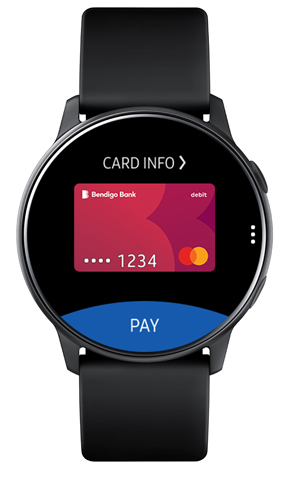
Simply hold down the back button on your Samsung smartwatch, tap pay on your watch screen, then tap your watch on the terminal.
The purchase amount will be debited from the first card displayed.
Frequently asked questions
Everything you need to know about your Samsung Pay.
How do I get Samsung Pay?
Samsung Pay is preloaded on Australian Samsung eligible smartphones.
Which Bendigo Bank cards will Samsung Pay work with?
Samsung Pay supports all our Bendigo Bank credit cards and Debit Mastercard.
Is Samsung Pay secure?
Using your Bendigo Bank cards with Samsung Pay is secure:
- When you use Samsung Pay, your card number is never shared with the merchant or saved on your device.
- You are required to unlock your device either by biometrics or PIN.
- Bendigo Bank monitors unusual activity across all your transactions 24/7.
- And don’t forget, you are still protected by Mastercard's Zero Liability policies.
How do I keep my device and card details secure?
Contact us as soon as possible if you suspect any unauthorised use of your device, if it is lost/stolen, or if you think your details have been compromised.
Never leave your device unattended. Use appropriate security on your device such as passcodes and fingerprint recognition. Only register your own fingerprint (if your device supports this feature).
Please be aware of unsolicited messages asking you to install software, to allow access to your devices or to reveal any personal or financial information.
Use anti-virus software, update it regularly and accept any updates to the Device’s OS.
What happens if my phone is lost or stolen?
If your device is lost or stolen, you can use Samsung’s Find My Mobile service to remotely Lock or Wipe your device (also Locking or Wiping Samsung Pay and all the payment cards registered in it).
Alternatively, call the Bank on 1300 236 344 and we'll suspend or delete your Samsung Pay Digital Card Numbers.
You can still use your plastic card.
How do I update Samsung Pay if my card is lost or stolen?
Please call the Bank immediately. We will cancel your card and order you a replacement.
Alternatively, you can block your card via the Bendigo Bank app using the card control 'temporarily block card'.
Your card can also be close and replaced via the app using the 'report card lost or stolen' option.
Your Samsung Virtual Account Number will automatically be updated with your new card details, so you can continue making purchases while you wait for your plastic card to arrive.
You will still need to activate your plastic card when received.
If I receive a replacement Bendigo Bank card, do I need to add my card again?
Generally, no if you receive a replacement card your Samsung Virtual Account Number will be automatically updated with the new card details, allowing you to continue to use your wallet while you wait for your plastic card to arrive.
However if, your card has been replaced due to being compromised through fraudulent activity, you will need to add your new card to your wallet.
Do I still get reward points when I use Samsung Pay?
Yes, if you are using a credit card with rewards you’ll continue earn points when using Samsung Pay.
Can I view transactions in Samsung Pay?
Up to 20 of your latest transactions1 made with Samsung Pay can be viewed in the Samsung Wallet for one month from the time of purchase. Simply tap on a registered card in the wallet to see all the Samsung Pay transactions made with that card2.
Additionally, a real-time3 push notifications with transaction details can be sent after each Samsung Pay purchase.
Always refer to the statement or e-banking for more transactions
1Some cards will only display the last 10 transactions
2Transaction information is not provided for all cards
3Real-time push notifications require an active internet connection
How do I remove a card?
- Open the Samsung Wallet.
- Tap the ‘All’ tab, and then tap ‘Payment cards’.
- Select the card you want to remove.
- Press the three dots in the top right-hand corner of your phone’s screen and tap delete card. You may be asked to enter your Samsung Pay PIN or biometrics. Then, tap ‘Delete’ when prompted.
What card data is stored on the phone?
Samsung Pay doesn’t store your actual credit or debit card number. Instead we use a Digital Card number to represent your account information — so your card details stay safe.
Learn more about Samsung Pay
More information
Things you should know
Samsung and Samsung Pay are trademarks or registered trademarks of Samsung Electronics Co., Ltd.
Mastercard® is a registered trademark, and the circles design is a trademark of Mastercard International Incorporated.